
Create Refund
5 minute read
Ping Payments supports both full and partial Refunds through a single, unified API endpoint — regardless of the original Payment method. Most Refunds are processed asynchronously. Once a Refund is initiated, Ping will send callback notifications to your system, following the same pattern as with the InitiatePayment endpoint.
Refund Flow Overview
This sequence diagram shows the basic API calls and responses for Refunds. Later sections cover each step in depth, with full schemas, examples, and callback details.
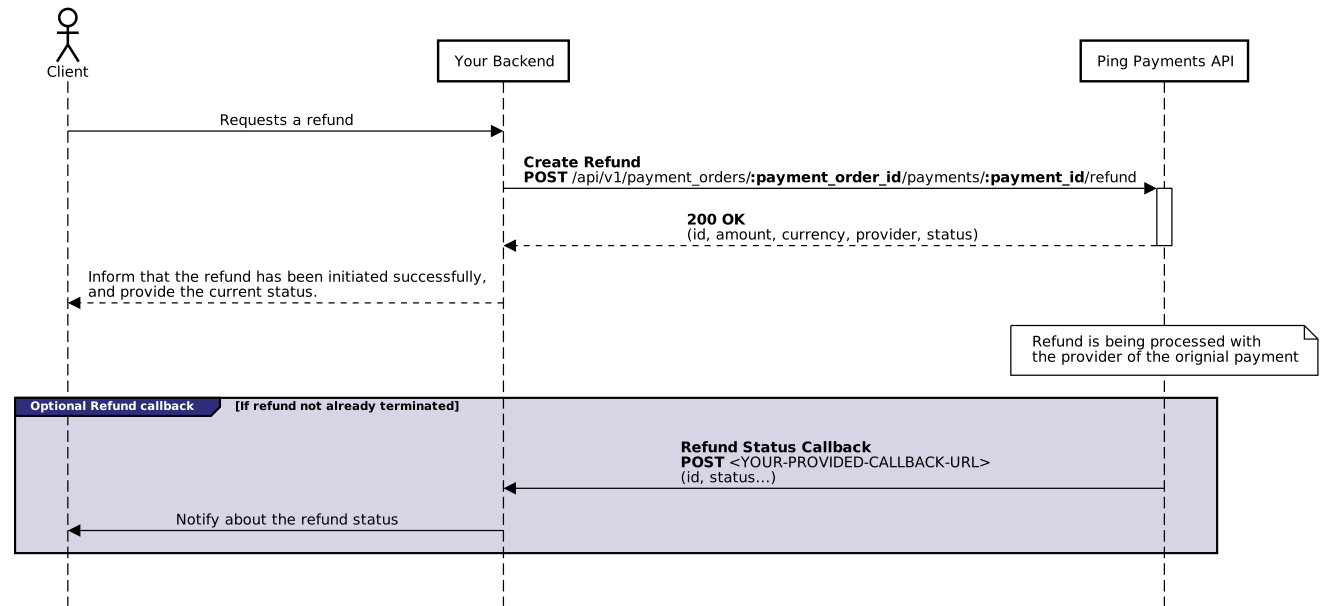
API Parameters
Request Parameters
| Name | Description |
|---|---|
items | How much of each item of the Payment to refund. One entry per item, each with the item's id and the amount of it to refund in Minor Currency Unit. The Refund amount is their sum. At least one entry is required. |
currency | ISO 4217 currency code for the Refund (e.g. EUR, SEK). Must be the same as the Payment currency. |
reason | Enum which describes the reason for refund. One of requested_by_customer, fraudulent or other. |
description | Short description to clarifying why the Refund is performed |
message | Message that will be shown to the original Payer |
You say what is being refunded, not what the Payment should be left holding. An item may be named once per Refund, and can be refunded again in a later Refund, but never past its own amount in total.
Note:
itemsreplaces theamountandorder_itemsparameters of API versions before2026-08-24. A Refund sent on an older version is carried out the way that version means it, but the older body cannot refund a settled Payment Order. See Migration to 2026-08-24.
Item ids
The id in each entry is the item id on the Payment. You can also supply your own when you create the Payment, by putting an id on each order_items entry. It must be a unique UUID4. Ping assigns one to any item you leave it off.
Note: Unlike from the InitiatePayment, the callback URL is not set when creating the Refund. Instead it's configured on Tenant level. See Update Tenant to learn how to configure this callback URL.
Response Parameters
| Name | Description |
|---|---|
id | The ID of the Refund. This will be provided in the Refund status callback. |
currency | The currency of the Refund, same as in the request parameter |
amount | The amount of the Refund, the sum of the amounts in items |
provider | The provider which facilitated the Refund. Will be the same as the provider Payment that is being refunded. |
status | The initial status of the Refund. |
Where the money comes from
The request is the same whether or not the Payment Order has settled. What differs is whose money pays for the Refund.
Order is OPEN or CLOSED | Order is SETTLED | |
|---|---|---|
| The money comes from | The original Payment, whose funds Ping still holds. Nothing has been allocated yet. | The recipients it was settled to. |
| The Payment afterwards | Left holding what was not refunded, so the eventual Split allocates less. | Unchanged. The allocation is already final, and the Refund is recorded against the item instead. |
| Can be refused for lack of funds | No | Yes, if the recipients no longer hold it |
| Visible on a payout | No | Yes, as a deduction on the recipient's next payout |
Who gives the money back
On a settled order, Ping looks at who was settled each item named in the Refund, and takes back a share in proportion to what each of them took.
Consider an item of 250.00 kr that settled as 235.00 kr to the Merchant, 10.00 kr in Tenant fee and 5.00 kr in platform fee. A Refund of 50.00 kr of that item, a fifth of it, is reclaimed as:
| Recipient | Settled | Reclaimed |
|---|---|---|
| Merchant | 235.00 kr | 47.00 kr |
| Tenant (fee) | 10.00 kr | 2.00 kr |
| Payment facilitator (platform fee) | 5.00 kr | 1.00 kr |
Nobody is asked for more than their share. A Tenant that took four percent of an item gives back four percent of any Refund of it, and a Merchant is never made to cover a fee it never received. Whatever the division leaves over in minor units goes to the recipients the rounding cut the most, so the same Refund of the same item always falls the same way.
The whole Refund is refused if any single recipient cannot cover its share. There is no partial reclaim, because a Refund that pays the Payer only part of what was asked for is worse than one that does not happen.
Each reclaim is carried on the recipient's next payout as an entry of its own, so the deduction is visible to whoever reads the payout. See What a payout is made of.
Example - Full Refund
Minimal example displaying how to perform a full Refund.
In this example, lets assume the Payment has a single item of 299.00 SEK.
Request
curl --location 'https://sandbox.pingpayments.com/payments/api/v1/payment_orders/<YOUR-PAYMENT-ORDER-ID>/payments/<YOUR-PAYMENT-ID>/refund' \
--header 'tenant_id: <YOUR-TENANT-ID>' \
--header 'x-api-secret: <YOUR-API-SECRET>' \
--header 'x-api-version: 2026-08-24' \
--header 'Content-Type: application/json' \
--data '{
    "currency": "SEK",
    "reason": "requested_by_customer",
    "description": "Test refund",
    "items": [
      {
          "id": "00328a14-fd85-4c08-a02b-7ecbeed110d1",
          "amount": 29900
      }
    ]
}'
Every item of the Payment is named for its full amount, which is what makes this a full Refund.
Response
{
    "id": "e2fbcec8-4858-40f0-ba7f-7fcf82653f58",
    "status": "PENDING",
    "currency": "SEK",
    "provider": "swish",
    "amount": 29900
}
Example - Partial Refund
Minimal example displaying how to perform a partial Refund.
In this example, let's assume the Payment has a single item of 299.00 SEK and we only want to refund 100.00 SEK of it.
Request
curl --location 'https://sandbox.pingpayments.com/payments/api/v1/payment_orders/<YOUR-PAYMENT-ORDER-ID>/payments/<YOUR-PAYMENT-ID>/refund' \
--header 'tenant_id: <YOUR-TENANT-ID>' \
--header 'x-api-secret: <YOUR-API-SECRET>' \
--header 'x-api-version: 2026-08-24' \
--header 'Content-Type: application/json' \
--data '{
    "currency": "SEK",
    "reason": "requested_by_customer",
    "description": "Test refund",
    "items": [
      {
          "id": "00328a14-fd85-4c08-a02b-7ecbeed110d1",
          "amount": 10000
      }
    ]
}'
Only part of the item is named, so only that part is refunded. Refunding a Payment made up of several items works the same way: name the ones being refunded and leave the rest out.
If this Payment Order has not settled yet, only 199.00 SEK will be allocated to the Merchant when it does. If it has already settled, 100.00 SEK is reclaimed from the recipients it was settled to.
Response
{
    "id": "e2fbcec8-4858-40f0-ba7f-7fcf82653f58",
    "status": "PENDING",
    "currency": "SEK",
    "provider": "swish",
    "amount": 10000
}
Rejected refunds
Beyond the conditions in When can a refund be performed?, these are the errors the request itself can come back with.
insufficient_settled_balance is worth handling as an outcome rather than a bug. It means a recipient's settled balance is too low to absorb its share.
| Error | Status | Meaning |
|---|---|---|
items_not_found_on_payment | 422 | One or more of the items named are not part of the Payment. |
refund_amount_exceeds_remaining_item_amount | 422 | An item was refunded past what is left of it, counting any earlier Refunds. |
insufficient_settled_balance | 422 | The order has settled and its recipients no longer hold enough to cover the Refund. |
post_settlement_refund_not_enabled | 403 | The order has settled and refunding settled items is not enabled on your Tenant. |
payment_order_not_settled | 422 | The order has been split but not settled. Settle it, then refund. |
Status callback
Ping will post callbacks regarding the Refund status to the configured callback URL to let you now the exact state of the refund enabling you to react accordingly.
Note: To ensure robust callbacks ping will make up to 20 attempts with exponential back off to make sure the callback is allays delivered.
Possible refund statuses
| Status | Type | Description |
|---|---|---|
| PENDING | non-terminated | If the refund is successfully initiated the status will transition to PENDING, which indicates that the Payment is ongoing. |
| COMPLETED | terminated | The original payer has successfully been refunded |
| DECLINED | terminated | The refund was declined by the original Payment provider. See details field information of why the Refund was declined. |
| FAILED | terminated | The original Payment provider failed to perform the Refund. See details field information of why the Refund was failed. |
Note: Once a Refund is terminated, no more status-callbacks will be sent regarding that Refund
On a Refund of a settled order, DECLINED and FAILED also give the reclaimed money back to the recipients it was taken from.
Updated 14 days ago